FAQ
The questions you should be asking
How do I search the SharePoint recycle bin by file name?
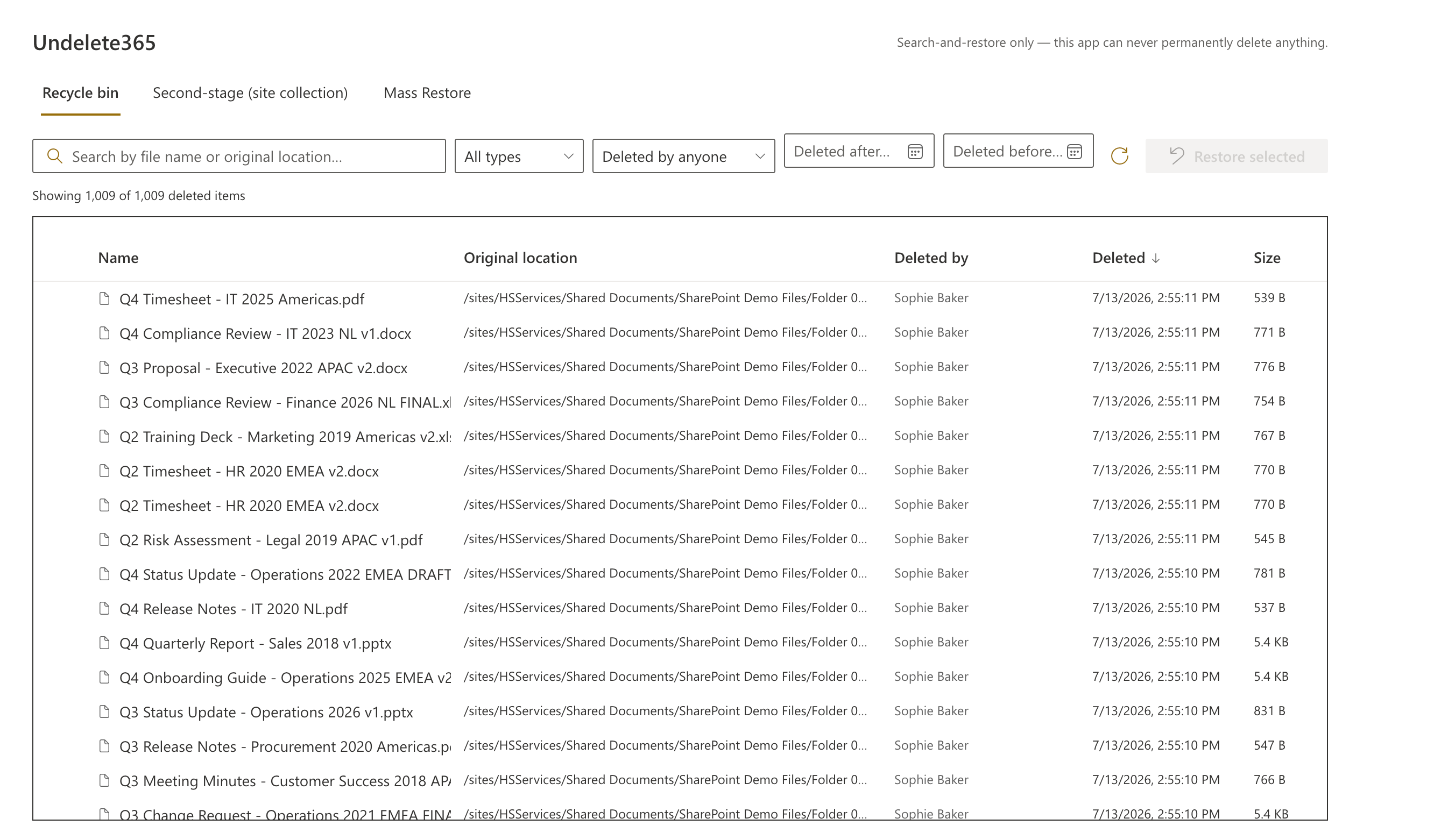
Type part of the name into the search box and Undelete365 filters the recycle bin instantly — no endless scrolling. This is the free tier: it runs the same search engine as Pro across the whole bin and shows each match's name, type, original location, and size. SharePoint's native recycle bin has no search at all, which is exactly the gap this closes.
Can I bulk-restore SharePoint files without PowerShell?
Yes — that's what Mass Restore is for. You set criteria (a user, a date range, a name pattern), preview the exact matches in a mandatory dry-run, and restore them all in one job. No scripts, no PnP modules, and no "list view threshold exceeded" error: it pages through large bins in batches and adapts whenever SharePoint throttles. If you've already tried the usual Get-PnPRecycleBinItem | Where-Object DeletedByEmail | Restore-PnPRecycleBinItem pipeline, this is the same result without the module install, the throttling tuning, or the 2,000-row limit. Full comparison with the script.
How do I restore files a former employee deleted?
Filter the recycle bin by who deleted the items — optionally within a date range — preview the matches, and restore them in one Mass Restore job. It's the common offboarding case: someone left, their files were deleted, and you need them back before the retention window closes.
How long do deleted files stay in the SharePoint recycle bin?
93 days total, across both stages — the first-stage (site) recycle bin and then the second-stage (site collection) bin. Undelete365 searches both (the second-stage bin requires site collection admin, which is SharePoint's own rule). Restore anything within that window; this tool is for recovery while items are still in the bin.
I deleted a file in OneDrive or SharePoint and it's not in my Windows Recycle Bin. Where did it go?
Since May 2026 it no longer goes there. Microsoft changed the sync client (Message Center MC1269861): a file that's deleted in the cloud — on the web, from another device, or by a colleague — is now removed straight from your disk and skips the Windows Recycle Bin and macOS Trash entirely. Only files you delete locally still land there. There is no admin setting to turn this back on. The copy you're looking for is in the SharePoint or OneDrive web recycle bin, for 93 days — which is exactly the bin Undelete365 searches. If you used to rescue files from the desktop Recycle Bin, that habit now points at the wrong place.
Can I recover files after the 93 days expire?
No — once the 93-day retention window passes, the items are gone from the recycle bin and no in-tenant tool can bring them back; that's SharePoint's boundary, not ours. Undelete365 is for fast search-and-restore while files are still in the bin. For recovery beyond 93 days you need a backup product that was already capturing your tenant before the deletion happened.
Doesn't Microsoft already do this?
Partly, and for different situations. The native recycle bin has no search and restores items one page at a time. Restore this library rolls an entire library back to a point in time — everyone's work, not just the deleted files — and only within the last 30 days. Microsoft 365 Backup restores from its own snapshots, not from the recycle bin: it only covers the sites you enrolled in advance, and it bills per GB protected, every month, whether you ever restore or not. SharePoint Advanced Management ($3 per user per month) is governance reporting; it doesn't restore anything. Undelete365 is for the case all of those leave open: the files are still in the recycle bin, you need to find the ones one person deleted last Tuesday, and you want them back without touching anything else — €249 once, no per-GB meter, no script.
Is this a subscription?
No. €249 once, per tenant. There is no recurring billing, no annual renewal, and no per-seat pricing that grows with your organization — every site collection and every user on that tenant is covered by the same single payment.
Can this permanently delete anything?
No. The application code contains exactly three SharePoint network calls — two reads and one restore. None of SharePoint's removal endpoints appear in the source or the compiled bundle, and the included verify-compiled-package.js checks that against what you actually received. Restoring is itself reversible: re-deleting the item puts it back in the bin.
What permissions does it need?
None to configure. It requests zero API permissions and uses the signed-in user's existing SharePoint session. Users can only see and restore what they could already see and restore in SharePoint's own recycle bin UI.
What exactly is free?
Finding things — for real, not a demo. The Free tier runs the same search and filter engine as Pro: same accuracy, same result count. It shows the item's name, type, original location, and size in full, so you can confirm it actually found your file. What it masks: who deleted it and exactly when — shown as a lock icon, not the real values — and filtering by deleted-by or by date range is Pro-only. That's deliberate: those two facts are exactly what you'd need to go find the item yourself in SharePoint's native recycle bin, which lists everything in one chronological list. Pro removes the mask and adds one-click and mass restore. Same package either way; a license key is the only difference.
How big a recycle bin can Mass Restore handle?
It's built for bins with 100,000+ items. It pages through the bin rather than loading it at once, restores in small batches, and adapts its pace whenever SharePoint throttles (HTTP 429/503 with Retry-After — it waits exactly as instructed). The practical constraint is time, not size: a very large job runs longer, shows live progress, and resumes if you close the tab — re-running the same criteria continues where it stopped, because restored items have already left the bin.
Doesn't a mass-restore engine need new, scarier endpoints?
No — and that's the whole point. Mass Restore adds zero new endpoints. It orchestrates the same three SharePoint calls in the audit table: two reads and one restore. Those three rows are unchanged from the day we launched — the only row the table ever gained is the Pro license check — and the verifier in your download still proves it against the exact package you received.
What data leaves my tenant?
For Pro, exactly one request: the license check. It carries the product name, your license key, and your tenant hostname (for example contoso.sharepoint.com) — never file names, file contents, or user names. A successful check is cached for 7 days, and a network failure gives you a 14-day grace period before Pro features lock. The Free tier doesn't even make that call: nothing leaves your tenant at all.
Can I just share my package with someone else?
The package, yes — the Free tier is for everyone; pass it along. Pro features only unlock with a valid license key, which is tied to one tenant and revocable. A shared or revoked key unlocks nothing. Licensing never changes what the app can do or what data it touches — only whether Pro features are available.
Why does the second-stage bin require site collection admin?
That's SharePoint's rule, not ours — the second-stage (site collection) bin is admin-only by design. The web part doesn't elevate anyone: non-admins get a 403 from SharePoint, and the tab is simply hidden for them.
What happens on a name conflict when restoring?
The restore for that item fails safely. Nothing is overwritten; the item stays in the recycle bin, untouched, and the list shows you the reason so you can rename or move the conflicting file first. In Mass Restore, every conflict lands in the failure report, exportable as CSV.
Does it work on classic sites?
SPFx web parts only run on modern pages. On a classic-only site you can still use it via SharePoint's built-in hosted workbench (/_layouts/15/workbench.aspx) — same permissions model, no extra risk.
Does it need custom scripting enabled?
No. Undelete365 is a standard SPFx web part, the deployment model Microsoft sanctions for SharePoint Online — it declares requiresCustomScript: false in its manifest and runs with custom scripting off, which is the default and the direction Microsoft is taking every tenant. That's the difference from the PowerShell workarounds and script-based tools you'll find in forum threads: those depend on a setting that is being locked down. Nothing here does.
What's your refund policy?
There is no refund policy — purchases are final, for this and every HS Services product. A Pro key unlocks the software instantly and irreversibly the moment payment clears, so there's nothing left to reverse afterward. Try Free first: it costs nothing, needs no form, and ships with the same verifier script, so you can confirm exactly what Pro does before you pay for it.